Google Messages seems to be the app the developers are really focused on currently, as it has received plenty of interesting updates in recent times. For instance, its Details page was updated to make it more useful. Now, a new report suggests another major change coming to the approach the messaging app follows when you delete a message.
Quickly recover your message if it was deleted mistakenly
Currently, when you try to delete a message in Google Messages, you will see a pop-up that says, "This is permanent and can't be undone." Basically, this means that the moment you hit the "Delete" button in the pop-up, your message will be permanently deleted. However, there may be times when you end up deleting a conversation accidentally, or you realize later that you need a message that you deleted a few days ago.
Recommended For You
To ensure your messages remain accessible to you even after deleting them, Google has introduced a Trash feature to its messaging app. It has reportedly been spotted in the app beta version 20260227.
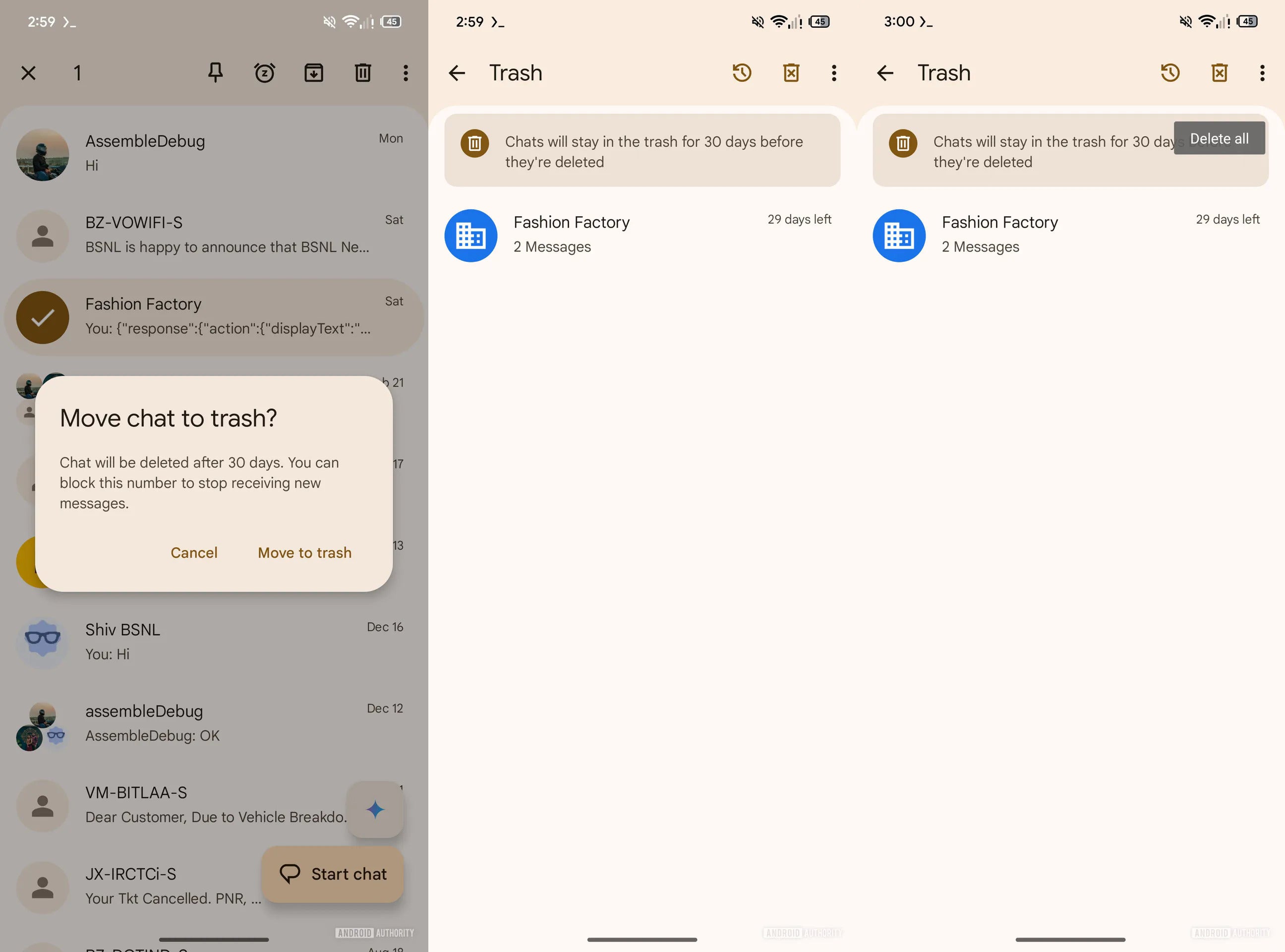
The trash feature replaces the current delete option in Google Messages. Following this change, when you delete a message, it will be sent to a new trash folder instead of being permanently deleted. The folder can be accessed by tapping your profile icon in the top-right corner of the app and then selecting the "Trash" option.
Recommended For You
All the deleted messages will remain in this folder for 30 days. At the top, you will see a "restore all" or "delete all" icon, which will allow you to restore or delete all the messages at once. You also have the option of individually restoring or deleting a message.
The Delete option that appears when you open a conversation and tap the three-dot menu has also been replaced with the new Trash option. Furthermore, the swipe actions menu has been updated to show the new Trash option instead of Delete.
In essence, once this update rolls out to the stable channel, you will no longer be able to permanently delete messages directly. They will first move to the Trash section. And in case you are pretty certain that a particular message is really not helpful, then you can delete it from the trash section to get rid of it for good.
Which messaging app do you think is best in terms of the features it offers?
Google Messages.
54.3%
Apple Messages.
9.68%
Samsung Messages.
23.12%
WhatsApp or something else.
12.9%
186 Votes
A feature inspired by Samsung Messages and Apple Messages
Trash feature of Google Messages. | Image by Android Authority
If you have ever used Samsung Messages or Apple Messages, then the concept of a trash folder must seem familiar to you. The Samsung messaging app comes with a dedicated Recycle Bin section, which also stores the chats when you delete them for 30 days before permanently wiping them out.
Similarly, when you delete a message on an Apple device, it isn't wiped out completely right away. Instead, it is moved to the Recently Deleted section, from where you can either restore the message or delete it permanently.
Both Samsung Messages and Apple Messages have had this ability for years. Fortunately, it's now coming to Google Messages as well.
Aman Kumar is a tech news writer with a long-standing passion for smartphones. Aman specializes in everything smartphones, from AI features like Pixel’s Camera Coach to understanding ideal hardware combinations. He loves breaking down complex features in a simple, clear way and hopes manufacturers bring back bold designs like the Nokia N-Gage. When he’s not writing, he’s either gaming on PUBG or talking fitness as a dedicated gym enthusiast.
A discussion is a place, where people can voice their opinion, no matter if it
is positive, neutral or negative. However, when posting, one must stay true to the topic, and not just share some
random thoughts, which are not directly related to the matter.
Things that are NOT allowed:
Off-topic talk - you must stick to the subject of discussion
Offensive, hate speech - if you want to say something, say it politely
Spam/Advertisements - these posts are deleted
Multiple accounts - one person can have only one account
Impersonations and offensive nicknames - these accounts get banned
To help keep our community safe and free from spam, we apply temporary limits to newly created accounts:
New accounts created within the last 24 hours may experience restrictions on how frequently they can
post or comment.
These limits are in place as a precaution and will automatically lift.
Moderation is done by humans. We try to be as objective as possible and moderate with zero bias. If you think a
post should be moderated - please, report it.
Have a question about the rules or why you have been moderated/limited/banned? Please,
contact us.













Things that are NOT allowed:
To help keep our community safe and free from spam, we apply temporary limits to newly created accounts: