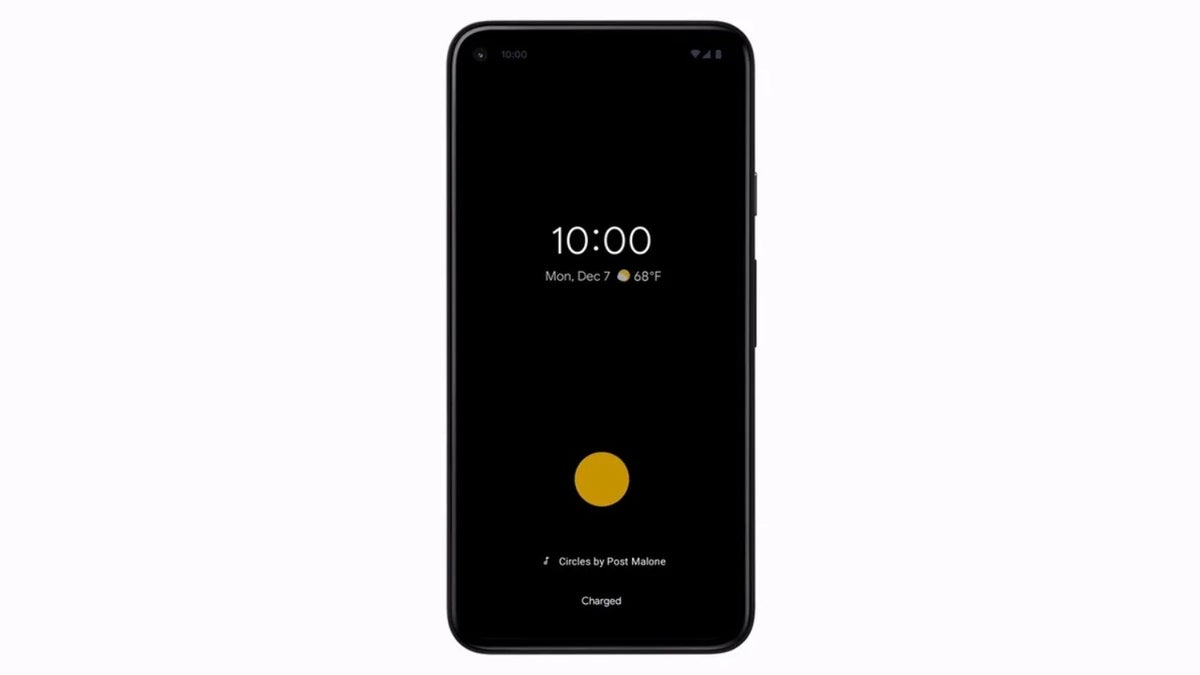
Google Pixel Now Playing feature. | Image by Google
Now Playing is one of many features that has been available on Pixel phones since their inception. It allows you to quickly identify music playing in the background. It was recently reported that Google is working on a dedicated Now Playing app. That has finally happened, but don't get too excited, as there's currently a big catch you need to be aware of before heading to the Play Store to download it.
Everything you need to know about the Now Playing app
The first time I accessed Now Playing on my Pixel 10, my initial thought was that I was looking at a feature that hadn't been updated for years. Its interface looked really outdated compared to Google's other features and services. The new Now Playing app solves all those concerns.
Recommended For You
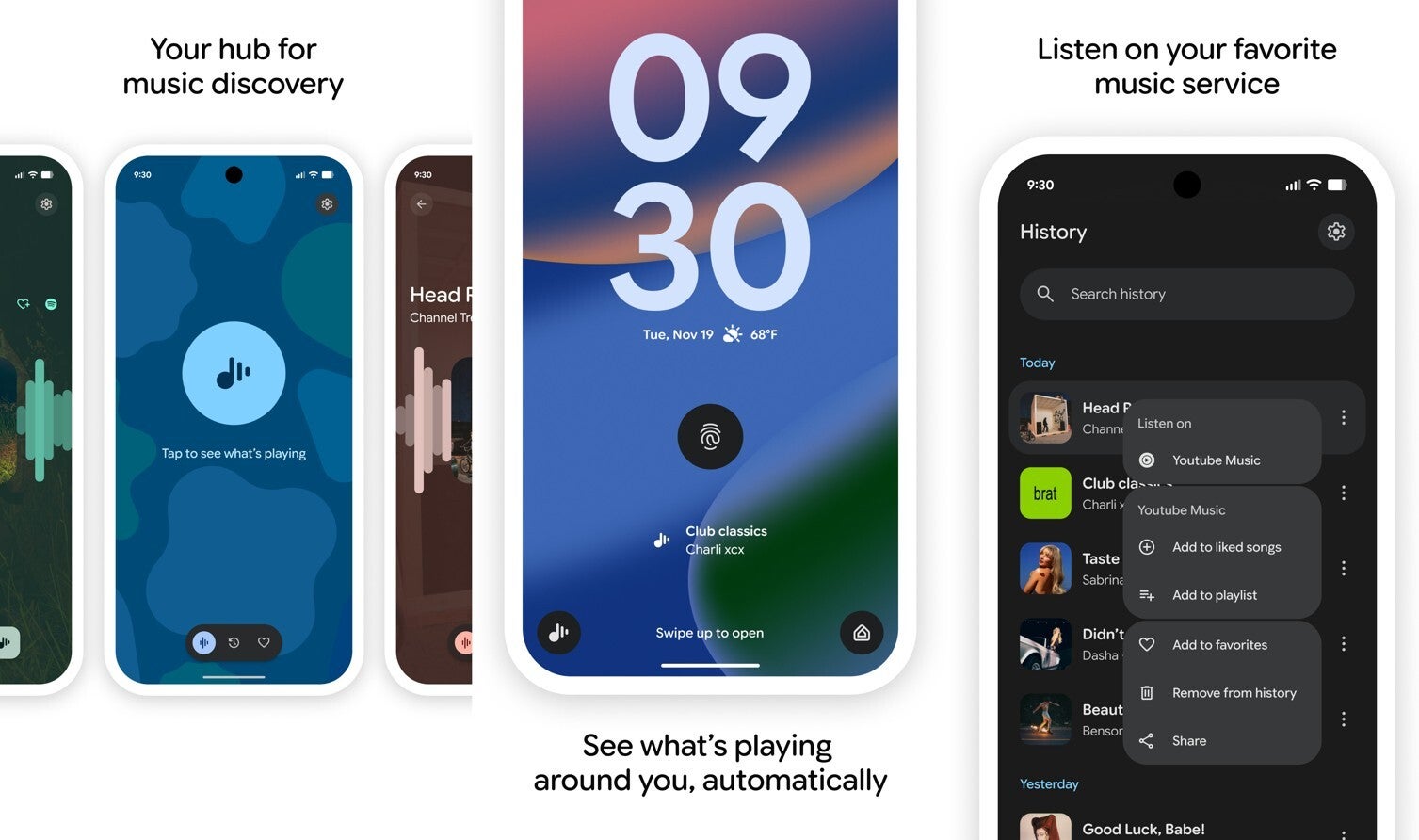
The app leverages the M3 expressive and looks completely modern and on par with other Pixel apps. You'll see a floating toolbar at the bottom of the app with three tabs. The first tab has a dedicated button at the center of the screen that you can tap to see what's playing.
Once the song has been identified, you can play it using the music service of your choice. The second is the History tab, which contains all the songs that the feature has previously identified. You can swipe left on any song in the history list to see additional options like Share, Add to Favorites, Remove from History, and more.
Recommended For You
The third tab contains all the songs that you have moved to your favorites list. Just like before, the identified song appears at the bottom of the lock screen. The Now Playing tile that you add to the home screen has also been revamped to give it a modern look.
Everything sounds perfect, so you might wonder, what's the catch I talked about in the introduction? You see, the app currently seems limited to the Pixel 10 series, and that too only on devices running the Android 17 beta. If your Pixel runs Android 16 like mine, or you try to download the app on an older Pixel lineup, you'll see the message "This app isn't compatible with your device. Contact the developers for more info" on its Play Store page.
Do you think Google has done the right thing by giving Now Playing its dedicated app?
Yes, it'll allow the feature to get more recognition.
43.01%
It'll make it easier for Google to add more features to it.
20.98%
It was perfect as it was.
17.13%
I didn't even know this feature existed.
18.88%
286 Votes
A dedicated app is always better
Now Playing app on a Pixel phone. | Image by Google
I believe the tech giant has done the right thing by giving Now Playing a standalone app. Many Pixel users might not know about the service as it is hidden inside the Settings menu. But now that it is available as a dedicated app, the possibility of them finding it becomes greater.
The only thing I want Google to do is to offer it as a pre-installed app on new Pixel devices, which will eventually allow it to be used by more users. A dedicated app will also make it easier for Google to update the service with more features. The company followed the same approach with its Weather feature. It was initially available as a built-in service but was later launched as a dedicated app. Since then, it has been updated regularly.
Last but not least, the availability of a standalone Now Playing app increases the possibility of it coming to more Android devices. Currently, you have to install third-party applications like Shazam on non-Pixel phones if you want to identify songs on them.
All that said, I am pretty certain that the app will soon leave its Pixel 10 and Android 17 beta exclusivity and become available to other Pixel devices running on older Android versions as well. There's no official confirmation on when that could happen, but if I have to take a random guess, then I would say that the app could become widely available with the March feature drop.
Aman Kumar is a tech news writer with a long-standing passion for smartphones. Aman specializes in everything smartphones, from AI features like Pixel’s Camera Coach to understanding ideal hardware combinations. He loves breaking down complex features in a simple, clear way and hopes manufacturers bring back bold designs like the Nokia N-Gage. When he’s not writing, he’s either gaming on PUBG or talking fitness as a dedicated gym enthusiast.
A discussion is a place, where people can voice their opinion, no matter if it
is positive, neutral or negative. However, when posting, one must stay true to the topic, and not just share some
random thoughts, which are not directly related to the matter.
Things that are NOT allowed:
Off-topic talk - you must stick to the subject of discussion
Offensive, hate speech - if you want to say something, say it politely
Spam/Advertisements - these posts are deleted
Multiple accounts - one person can have only one account
Impersonations and offensive nicknames - these accounts get banned
To help keep our community safe and free from spam, we apply temporary limits to newly created accounts:
New accounts created within the last 24 hours may experience restrictions on how frequently they can
post or comment.
These limits are in place as a precaution and will automatically lift.
Moderation is done by humans. We try to be as objective as possible and moderate with zero bias. If you think a
post should be moderated - please, report it.
Have a question about the rules or why you have been moderated/limited/banned? Please,
contact us.












Things that are NOT allowed:
To help keep our community safe and free from spam, we apply temporary limits to newly created accounts: