Marshall Monitor Bluetooth Headphones

Introduction
Your smartphone connects you to the world around you, making it easy to reach out and interact with people, companies, and online services. And for as much as those connections can do to enhance our lives, sometimes you just want a little peace and – well, maybe not necessarily quiet.
For the past few weeks now, we've been getting to know the Monitor Bluetooth from Marshall Headphones, examining how it sounds and putting its features to the test. Is this the pair that's finally going to make you ditch those cheap earbuds and upgrade to a slightly more polished (and hopefully better-sounding) audio experience? Read on to find out.
- Monitor Bluetooth headphones
- Carrying bag
- Male-to-male 1/8th-inch stereo cable
- Micro USB charging cable
Design and comfort
A rugged exterior conceals some smartly designed, comfortable touches

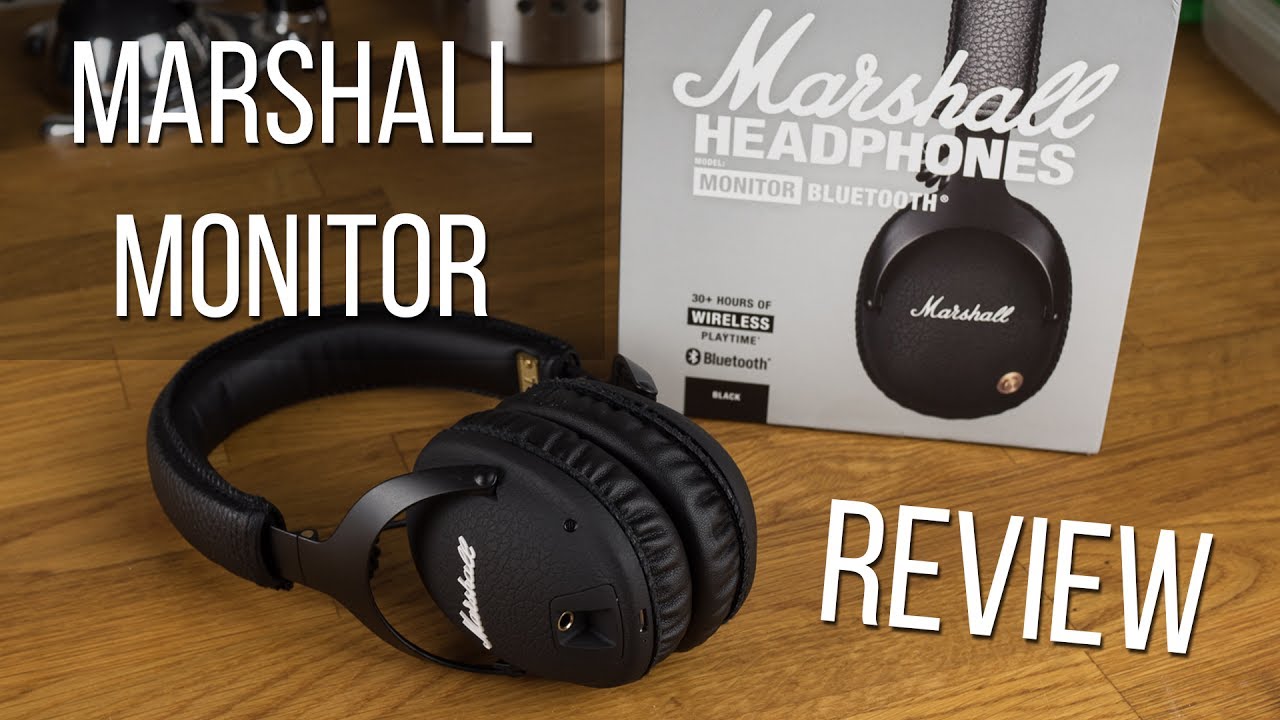
Marshall's a name that anyone with even a passing interest in music is going to recognize from speakers and amplifiers up on stage next to some of their favorite bands, and the same sort of rugged construction you need to survive with a band on tour carries over to the Monitor Bluetooth headphones.
Crafted from metal and black vinyl, the headphones feel really substantial. Part of that helps establish a sense of reliability in the hardware, but there's also a significant aesthetic component to it, and there's definitely something subtly aggressive about the design here.

While that's how the earpieces are physically connected, audio is shared between the two via a pair of short coiled cables that extend from each ear up into the headband. They look really nice, but seeing them stretched out during storage, and just being located so closely to metal hinges, has us worried about their durability – it seems like they're just one wrong move away from getting pinched and broken. Now, we absolutely did not have any issues like that at all during testing, but for a pair of headphones that are otherwise so resilient, we couldn't help but feel a little afraid of what seemed to be an exposed weak point.
Ever second-guess yourself about having headphones on the right way? Searched high and low for a tiny L or R silk-screened on in a shade of gray just slightly darker than its background? You'll run into no such obstacles with the Monitor Bluetooth, as these headphones proudly sport a pair of big brass plaques each embossed with an unmistakable L or R.
Meanwhile, all you'll find on the left earpiece is a single brass nubbin: the headphones' control knob, responsible for all your interactions with the hardware. Like the headphone jack and its functionality, we'll dive into what to expect from the control knob – what works and what doesn't – further on in this review.

The cushions are attached magnetically to the headset, should you ever need to replace them, though they stay on quite solidly during usage. Our only criticism has to do with the stitching around the edges here. It largely has a nice hand-made look to it, but we did spot a few stray threads here and there, and on one ear the cushion didn't quite sit flat against the earpiece body. That doesn't affect sound quality in the least, but if attention to aesthetic details matters to you, it's something worth keeping in mind.
Software and functionality
Music-sharing adds a new dimension to Bluetooth audio

Like most good pairs of Bluetooth headphones, the Marshall Headphones Monitor Bluetooth isn't reliant on some external app to get the job done: just pair it with a compatible Bluetooth device and you're good to go. Heck, it doesn't even have to support Bluetooth, and in a pinch you can use the included 1/8-inch stereo headphone cable to attach it to any hardware with a headphone jack.
The cable itself is really nicely made, with gold-plated connectors (one of which is right-angle), springy strain relievers. and even a coiled section in the middle for extra length when you need it.
But most of your usage is going to be over Bluetooth, and if your phone supports it, these headphones are all ready to tap into Qualcomm's aptX codec system. We'll be talking about sound quality just a little later on, but it should suffice to say that this is one very nice bit of functionality to have.
We just talked about how you can use the analog headphone jack to connect to non-Bluetooth devices, but it also has a second feature: when you are listening to music over Bluetooth, you can attach a second pair of headphones via that port to share your music with a friend.
That's an utterly fantastic capability, and we only really wish that Marshall Headphones went a bit further with it, maybe giving you an independent volume control for the second listener. There's also a small design consideration that might benefit from some tweaking: the headphone jack is mounted in parallel to the plane of the earpiece, and there's a sunken recess around it to accommodate a 1/8-inch plug and attached cable.
With really sleek headphone plugs, though, like those on Apple Earpods, we had a bit of trouble getting a grip on them to disconnect, and found ourselves forced to go the unfortunate route of yanking hard on the actual cable – never something we want to do. Some greater clearances, or a jack mounted perpendicularly, might be an improvement.
Controls
Marshall Headphones aims for simplicity, and for the most part succeeds

The little brass control on the headphones' left earpiece is your one-stop shop for any and all things control related. It's a miniature four-way joystick, tilting up, down, left, and right, and also clicking in when you press on its face. You'll press the button to power the headphones on and off, as well as press-and-hold to pair over Bluetooth. Tilting up and down works as your volume controls, while left and right control track advancement.
The control knob is very attractive, and its minimalist design fits in well with the rest of the look of the Monitor Bluetooth headphones. But since it's circular, and also because it's not at all marked or labeled to indicate functionality, it can occasionally be tricky to use.
Sound Quality
With a brand name like this you'd expect great-sounding audio, and we're not disappointed

Audio fidelity can be an extremely subjective subject, and even well-trained ears can disagree on a system's merits. But after spending a few weeks listening to all variety of music, media, and even making calls with the Monitor Bluetooth headphones, we feel pretty confident saying that these sound exceptionally nice.
Bass notes are rich and satisfying without overwhelming or causing distortion, while treble is clear and precise without sounding tinny or artificially emphasized. Mids might benefit from a little greater presence, but we're still very happy with the overall balance here.
On phone calls, remote parties sounded just fine, and if anything the high quality of these headphones only called more attention to the lossy compression of regular voice calls – but that's hardly something we're going to hold against Marshall Headphones. The microphone on the headphones works about as well as we'd expect, but it's clear that it's trading unobtrusive placement for quality – we were told we sounded a bit dark and harsh, but didn't have any problems coming through intelligibly.
Battery Life
Even with infrequent charges, battery life should never be a bit issue

Conclusion
The Marshall Headphones Monitor Bluetooth succeeds in part because of knowing exactly what it wants to be: a no-nonsense, straightforward pair of really high quality wireless headphones. Audio sounds clean and precise, but more than that the headphones look pretty cool, feel nice and solid, and are quite comfortable to wear.

What problems we have with the pair are relatively minor: the control knob can be a little finicky to push in the right direction, but it still feels responsive and well made. And while we're less than totally convinced as to the long-term durability of the exposed wire coils, it's hard to deny that they look pretty neat.
No, you don't get a ton of extra features here, but we're not sure we'd need them all in the first place. And even things we really like, such as active noise cancellation, are adequately addressed thanks to a snug-fitting design that helps keep ambient noise out.
Maybe the biggest obstacle to overcome in deciding to pick up the Monitor Bluetooth headphones is the price, and at $250, these are definitely on the steeper side of things. Part of that is paying for style, but if you like this classic rock-and-roll look, and you've got the money to spare, you should be seriously satisfied with what these headphones have to offer.

Follow us on Google News
Popular stories






Latest News




Things that are NOT allowed:
To help keep our community safe and free from spam, we apply temporary limits to newly created accounts: