If you've ever connected Google Messages to your laptop by pointing your phone at a QR code, that quick little ritual is going away.
Google Messages is ditching QR code pairing for web
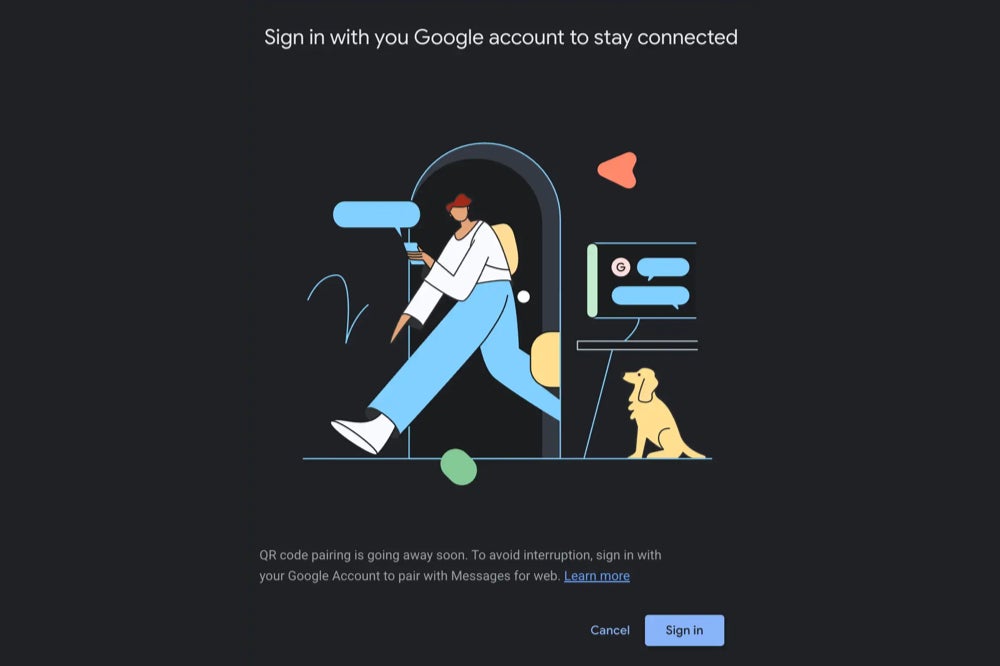
Right now, Google Messages for Web gives you two ways to get your texts showing up on your computer: scan a QR code with your phone or log in through your Google Account. However, a new report highlights the fact that the QR code route is getting cut, and Google Account sign-in will be the only way in going forward.
Recommended For You
For anyone who hasn't tried it, Google Messages for Web is pretty handy. It lets you text from your browser without having to reach for your phone every few minutes. The QR code method has been part of it from the start, and honestly, it's straightforward: open the app, scan the code on your screen, done. No passwords, no accounts, just scan your way in.
Google, it seems, has decided that method isn't enough anymore, as the QR option is going away entirely, and account sign-in will take over as the only method.
Why this is a bigger deal than it looks
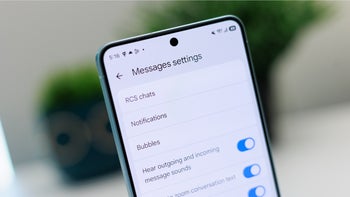
Google Messages QR code pairing is going away soon. | Image by 9to5Google
It's easy to write this off as a small behind-the-scenes tweak, but it does change things in a meaningful way. When your Messages session is tied to your Google Account instead of just your phone, the connection becomes more stable. Right now, if your phone drops signal or reboots, your web session can go sideways. Account-based sessions tend to hold up better through those kinds of hiccups.
Recommended For You
It also fits a pattern Google has been following for a while now. Across its apps, the company has been tightening everything around your Google Account, aiming for the kind of smooth, device-to-device continuity that Apple has had with iMessage for years. This change pushes Messages for web a step closer to that, making it feel less like a remote display for your phone and more like an app in its own right.
The downside is real, though. If you liked that the QR method didn't require tying anything to an account, that option is gone. No Google Account, no access. For privacy-conscious users, that's a legitimate frustration, not just a minor inconvenience.
How do you prefer to connect messaging apps to your computer?
A reasonable move, but not for everyone
Honestly, for most people, this probably won't feel like much of a loss once they get used to it. Account-based connections are sturdier, and the experience should feel more consistent day to day. It brings Google Messages for web up to speed with how WhatsApp's linked devices and iMessage already work, which isn't a bad place to land.
That said, I do think losing the friction-free, no-strings QR option is a real trade-off worth acknowledging. Not everyone wants their texting app hooked into their Google profile, and those users are now out of options.
The QR method is still working for now, so nothing changes immediately. But if it's part of your daily routine, it's worth switching over to account sign-in before the transition catches you off guard. We'll be watching for the official rollout date.
Johanna 'Jojo the Techie' is a skilled mobile technology expert with over 15 years of hands-on experience, specializing in the Google ecosystem and Pixel devices. Known for her user-friendly approach, she leverages her vast tech support background to provide accessible and insightful coverage on latest technology trends. As a recognized thought leader and former member of #TeamPixel, Johanna ensures she stays at the forefront of Google services and products, making her a reliable source for all things Pixel and ChromeOS.
A discussion is a place, where people can voice their opinion, no matter if it
is positive, neutral or negative. However, when posting, one must stay true to the topic, and not just share some
random thoughts, which are not directly related to the matter.
Things that are NOT allowed:
Off-topic talk - you must stick to the subject of discussion
Offensive, hate speech - if you want to say something, say it politely
Spam/Advertisements - these posts are deleted
Multiple accounts - one person can have only one account
Impersonations and offensive nicknames - these accounts get banned
To help keep our community safe and free from spam, we apply temporary limits to newly created accounts:
New accounts created within the last 24 hours may experience restrictions on how frequently they can
post or comment.
These limits are in place as a precaution and will automatically lift.
Moderation is done by humans. We try to be as objective as possible and moderate with zero bias. If you think a
post should be moderated - please, report it.
Have a question about the rules or why you have been moderated/limited/banned? Please,
contact us.









Things that are NOT allowed:
To help keep our community safe and free from spam, we apply temporary limits to newly created accounts: