Whether it's Microsoft, Apple, Google, or Samsung, all major tech companies are aggressively pushing AI-related tools onto their products. On Windows, you'll find Microsoft's native AI app, Copilot, installed in almost all Windows apps. However, a recent report suggests that the tech giant has slowly started removing Copilot from its applications.
What's the issue with Microsoft Copilot?
As it turns out, users have no problem with Copilot's functioning, but they definitely don't appreciate the way it's being forced on them. The AI companion was initially released as a standalone app that you could use if you wanted. However, Microsoft has slowly started integrating it into almost all its applications.
Recommended For You
It has been added to Microsoft Paint, the Edge browser, Clipchamp, and more. Most users definitely did not like this move, as they loved their Windows experience without any AI interference. Still, things had been controllable up until this point.
However, the company recently integrated its AI companion into Notepad, and it was clearly not welcomed by Windows users. Many users complain that Notepad is a mere text application and there's no need for any AI tool in it. The move was so disliked that a petition was created where everyone was asked to sign if they opposed Microsoft's decision to add Copilot to Windows.
Microsoft is finally taking action, but not in the way you might expect
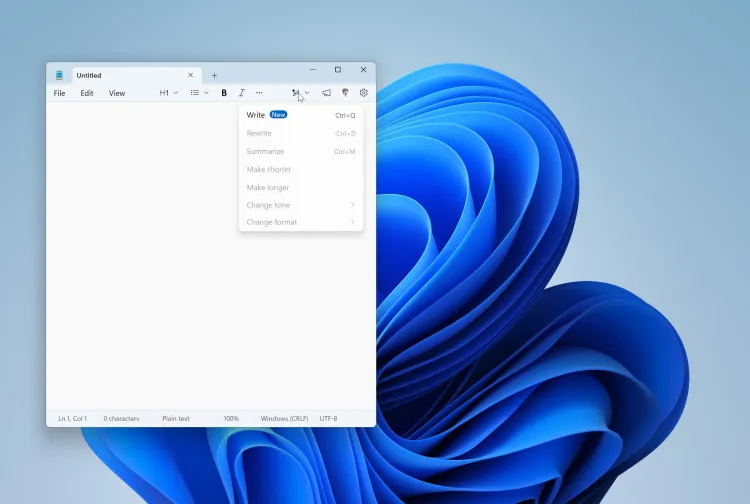
New writing tools button in Notepad. | Image by The Verge
Last month, Microsoft published a blog post stating that the company plans to improve Windows quality. One of the actions mentioned toward that goal is reducing unnecessary Copilot integrations in various Windows apps, such as Snipping Tool, Photos, Widgets, and Notepad.
Tom Warren, a reputable Windows enthusiast, recently reported that the tech giant has begun taking the action it outlined in its blog post. Copilot buttons are reportedly no longer available in certain Windows apps where they previously appeared. Tom notes that the AI button, which was once present in the Notepad app's top bar, is now gone.
Recommended For You
It has also been removed from the Snipping Tool app. All these sound great, right? Unfortunately, there's a big catch here.
As it turns out, only the Copilot button is being removed, but not the AI functions that it offered. In the Notepad app, instead of the Copilot button, you will find a new Writing Tools menu that offers all the same AI-powered features that existed before.
It's still a good step
Going through the blog post Microsoft published last month, many Windows enthusiasts, including me, thought that Copilot would be gone forever from apps like Notepad, where it really doesn't make any sense. However, as mentioned above, the tech giant is simply reducing the presence of Copilot across its Windows applications instead of getting rid of AI capabilities completely.
While this is definitely not the action everyone wanted from Microsoft, I think it's actually the right step. Please allow me to explain.
Looking at online feedback, one thing is certain: most Windows users want an AI-free experience. But apparently, the Redmond giant simply can't remove all the AI features from its operating system. While doing so would make the majority of its users who dislike AI happy again, at the same time, it would increase the risk of the company getting left behind in the latest AI race among big tech companies like Apple, Google, and others.
Most major tech brands have been integrating their AI models into their products. For instance, Gemini is now part of almost all Google applications, such as Google Messages, Gmail, and more. Similarly, Siri is reported to become more advanced with the upcoming iOS update.
Considering all this, disabling all the AI upgrades (no matter how tempting it may sound, as it might help Microsoft regain the love of its customers) doesn't seem like the right approach. The company is well aware that it cannot appease everyone. That's why I believe it is taking the middle ground of reducing the use of the Copilot name across its applications while keeping the AI features that are actually useful.
Do you use Copilot on Windows 11?
Turn off AI features
While Microsoft is taking necessary actions to improve the overall quality of Windows, you actually have the option to remove the AI features from certain Windows apps. For instance, on Notepad, you need to open the settings menu and then turn off the Copilot toggle to remove its button from the top bar.
All that said, if you've read this far, I'd highly appreciate you guys giving me a follow on X and Threads, where I regularly share my views on everything going on in the tech industry.
Aman Kumar is a tech news writer with a long-standing passion for smartphones. Aman specializes in everything smartphones, from AI features like Pixel’s Camera Coach to understanding ideal hardware combinations. He loves breaking down complex features in a simple, clear way and hopes manufacturers bring back bold designs like the Nokia N-Gage. When he’s not writing, he’s either gaming on PUBG or talking fitness as a dedicated gym enthusiast.
A discussion is a place, where people can voice their opinion, no matter if it
is positive, neutral or negative. However, when posting, one must stay true to the topic, and not just share some
random thoughts, which are not directly related to the matter.
Things that are NOT allowed:
Off-topic talk - you must stick to the subject of discussion
Offensive, hate speech - if you want to say something, say it politely
Spam/Advertisements - these posts are deleted
Multiple accounts - one person can have only one account
Impersonations and offensive nicknames - these accounts get banned
To help keep our community safe and free from spam, we apply temporary limits to newly created accounts:
New accounts created within the last 24 hours may experience restrictions on how frequently they can
post or comment.
These limits are in place as a precaution and will automatically lift.
Moderation is done by humans. We try to be as objective as possible and moderate with zero bias. If you think a
post should be moderated - please, report it.
Have a question about the rules or why you have been moderated/limited/banned? Please,
contact us.




![T-Mobile customers get confirmations for account activity they didn't authorize [UPDATED]](https://m-cdn.phonearena.com/images/article/179616-wide-two_350/T-Mobile-customers-get-confirmations-for-account-activity-they-didnt-authorize-UPDATED.webp)




Things that are NOT allowed:
To help keep our community safe and free from spam, we apply temporary limits to newly created accounts: