Whenever anyone asks me to share my current location, I open WhatsApp or Google Messages and go through the respective processes to send it to them. Although the process in both apps is quite straightforward, it involves plenty of steps. Fortunately, an upcoming Google Maps upgrade is going to make sharing locations a lot easier than before.
Share locations directly from Google Maps
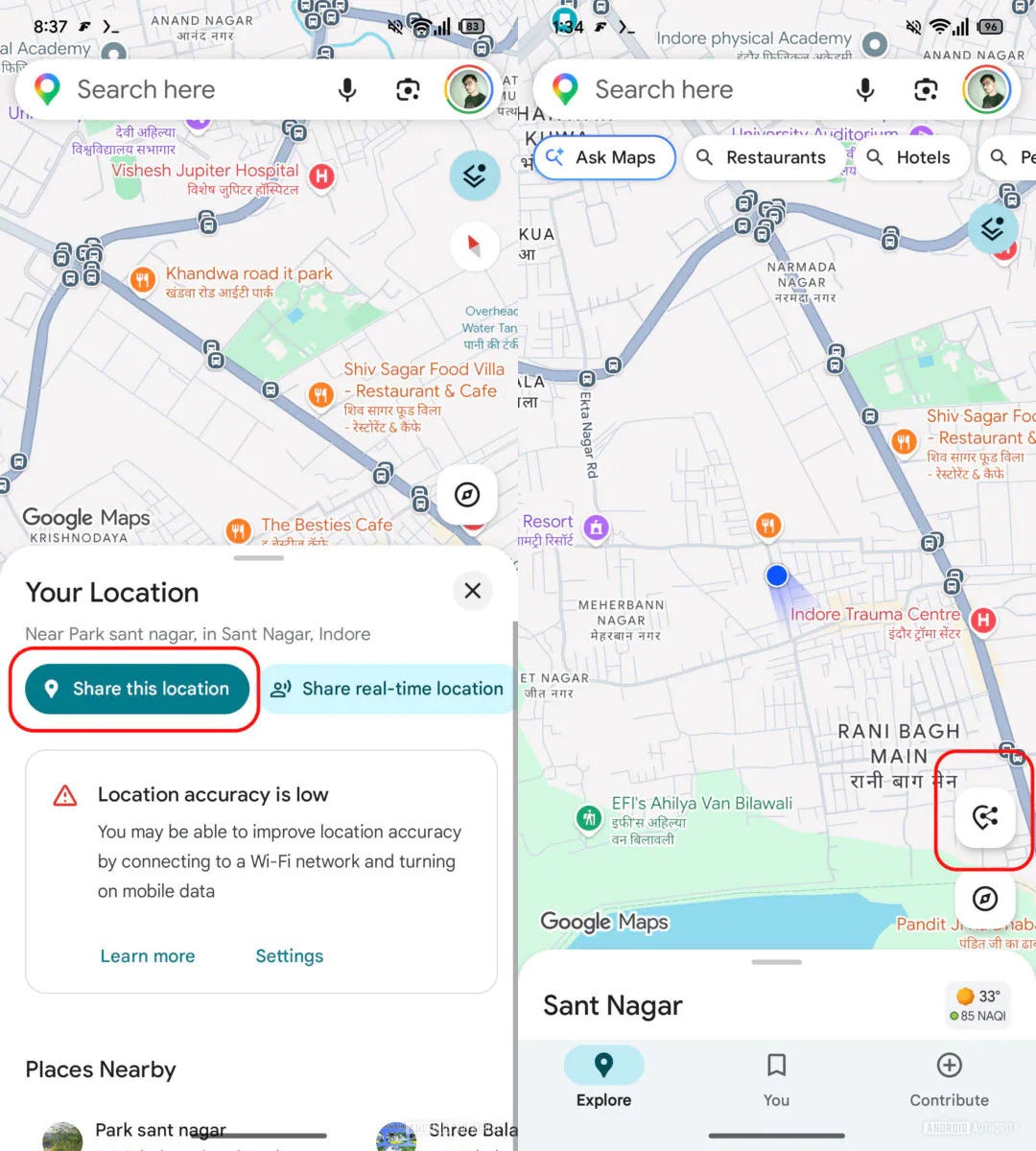
Not sure about you guys, but I recently found out that I can share locations directly through Google Maps. For those unaware, you need to open the app, tap the blue icon on the map that indicates your location, and an overlay window will appear with a dedicated "Share this location" button. Tap it to generate a URL of your current location, which you can then share via different platforms that show up in the share list.
However, in the app's version 26.12.03.884026066, Google is reportedly testing a new floating action button that eliminates the need to tap the blue icon to access the overlay window. You can simply tap the floating action button, which appears on the main map screen, to select the app through which you want to share your current location. The button automatically disappears when you explore other locations in the map.
Recommended For You
In addition to this, the tech giant is reportedly introducing changes to the menu that pops up when you tap the pill-shaped icon at the bottom of the app screen while navigating. Currently, all available options appear in list format. But in the upcoming update, Google has removed a few options it thinks were unnecessary and reformatted the rest as a grid with bigger icons.
The "Share trip progress" option is reportedly missing from the new UI. The "Show satellite map" and "Show traffic on map" options have also been removed from the list, but they are now available in the Google Maps settings menu.
Which do you think is the most feature-rich navigation app out there?
An important visual change
New floating action button in Google Maps. | Image by Android Authority
By making these changes, Google is clearly hoping that users will start using the Maps app directly to share their location instead of taking the long route of opening WhatsApp or Google Messages. Honestly, I have found sharing locations on Apple Maps to be much smoother.
On it, you simply need to open the app, swipe up from the bottom, and select the "Share My Location" option. But with the upcoming update in Google Maps, I feel confident that I will start liking its location-sharing experience as well. That said, all the above-mentioned changes are currently available only to limited users. Hopefully, it will see a broader rollout soon.
Aman Kumar is a tech news writer with a long-standing passion for smartphones. Aman specializes in everything smartphones, from AI features like Pixel’s Camera Coach to understanding ideal hardware combinations. He loves breaking down complex features in a simple, clear way and hopes manufacturers bring back bold designs like the Nokia N-Gage. When he’s not writing, he’s either gaming on PUBG or talking fitness as a dedicated gym enthusiast.
A discussion is a place, where people can voice their opinion, no matter if it
is positive, neutral or negative. However, when posting, one must stay true to the topic, and not just share some
random thoughts, which are not directly related to the matter.
Things that are NOT allowed:
Off-topic talk - you must stick to the subject of discussion
Offensive, hate speech - if you want to say something, say it politely
Spam/Advertisements - these posts are deleted
Multiple accounts - one person can have only one account
Impersonations and offensive nicknames - these accounts get banned
To help keep our community safe and free from spam, we apply temporary limits to newly created accounts:
New accounts created within the last 24 hours may experience restrictions on how frequently they can
post or comment.
These limits are in place as a precaution and will automatically lift.
Moderation is done by humans. We try to be as objective as possible and moderate with zero bias. If you think a
post should be moderated - please, report it.
Have a question about the rules or why you have been moderated/limited/banned? Please,
contact us.









Things that are NOT allowed:
To help keep our community safe and free from spam, we apply temporary limits to newly created accounts: