Android 16 has a serious VPN bug that could leave you exposed | Image by Google
You can use a VPN to access websites banned in your region or to browse the web without exposing your IP address. However, in the last few months, many users have reported that they can't connect to VPN servers on their Android smartphones. Different VPN providers have found in their investigations that the problem isn't with their apps, but instead it stems from a bug in Android 16. Here's everything you need to know about the bug and what you can do from your end to restore your VPN connection.
It has been breaking the VPN apps for 7 months
Using a VPN app is pretty straightforward. You simply need to select a server to which you want to connect and then hit the connect button. Once the connection is established, the VPN app will keep running in the background while you browse the internet anonymously.
Proton VPN recently posted about a bug in Android 16 that is affecting not only its app but almost all VPN service providers. According to the post, on some smartphones running Android 16, the VPN app fails to connect to the internet after you update it while it's active. This may leave users with the impression that their VPN app is faulty, but Proton VPN claims that the issue is actually caused by a bug in Android.
Recommended For You
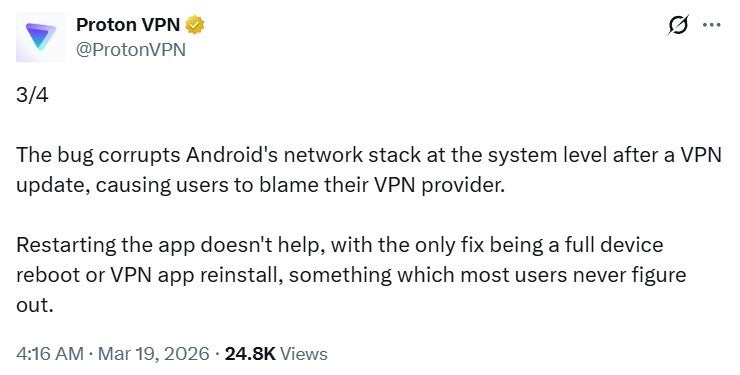
The post further mentions that Google has been informed of this issue by multiple VPN providers, including Mullvadnet, WireGuard, TunnelBear, and Proton VPN itself, yet no fix has been rolled out. The bug reportedly corrupts the Android network stack after you update your VPN app, which eventually ends up disconnecting you from the VPN in the background without giving you any sort of warning or prompt.
Despite multiple reports, Google has reportedly not properly addressed the situation. The only response the tech giant has given on this matter, as per the post, is that they "don't see anything unusual."
The problem isn't widespread, meaning not everyone who is on Android 16 and using a VPN service will experience it. Still, I was able to find a good number of reports online of users suffering from the situation. Pixel 7, Pixel 6a, Pixel 10 Pro, and Samsung Galaxy S25 Ultra are some of the many devices on which this particular problem has been experienced.
How important is a VPN app to you on your phone?
What can you do to restore your connection?
Proton VPN post about Android bug. | Image by Proton VPN on X
As mentioned above, Google has yet to officially address this bug, so no fix is available from them at the moment. Reports indicate that restarting the VPN app also fails to restore the connection. The only thing that appears to be working currently is reinstalling the VPN app. Rebooting the phone seems to also work for some users, so you can try this as well if you face this issue on your device.
Initially, it was speculated that the bug was triggering only when Always On VPN (one of the features of Proton VPN) was enabled. The VPN company, however, clarified that they were able to replicate the situation even when this feature wasn't enabled.
This isn't the only VPN-related issue we have heard of in Android 16. It was recently reported that the Pixel-only VPN by Google was unable to establish a connection on Android 16 beta 3.1. Android 16 as a whole has also been reported to cause various issues, especially on Pixel devices. For instance, we recently shared that the Pixel March update is making the lock screen completely unresponsive on some Pixel smartphones.
That said, given the number of complaints and Proton VPN's public callout of Google, I'm confident the tech giant will roll out a permanent solution soon. Until then, I recommend keeping an eye on your VPN's background behavior after updating it on your Android smartphone. If you find that it’s failing to establish a connection, try the fixes mentioned above.
Aman Kumar is a tech news writer with a long-standing passion for smartphones. Aman specializes in everything smartphones, from AI features like Pixel’s Camera Coach to understanding ideal hardware combinations. He loves breaking down complex features in a simple, clear way and hopes manufacturers bring back bold designs like the Nokia N-Gage. When he’s not writing, he’s either gaming on PUBG or talking fitness as a dedicated gym enthusiast.
A discussion is a place, where people can voice their opinion, no matter if it
is positive, neutral or negative. However, when posting, one must stay true to the topic, and not just share some
random thoughts, which are not directly related to the matter.
Things that are NOT allowed:
Off-topic talk - you must stick to the subject of discussion
Offensive, hate speech - if you want to say something, say it politely
Spam/Advertisements - these posts are deleted
Multiple accounts - one person can have only one account
Impersonations and offensive nicknames - these accounts get banned
To help keep our community safe and free from spam, we apply temporary limits to newly created accounts:
New accounts created within the last 24 hours may experience restrictions on how frequently they can
post or comment.
These limits are in place as a precaution and will automatically lift.
Moderation is done by humans. We try to be as objective as possible and moderate with zero bias. If you think a
post should be moderated - please, report it.
Have a question about the rules or why you have been moderated/limited/banned? Please,
contact us.







Things that are NOT allowed:
To help keep our community safe and free from spam, we apply temporary limits to newly created accounts: