In addition to sending normal text messages, WhatsApp is also used to share current and live locations. This incredible feature is now available on Google Messages too. Here's how you can use it.
Real-time location sharing in Google Messages
We recently reported that traces of a real-time location sharing option had been found in one of the beta versions of the Google Messages app. The feature has now finally started rolling out to the app's stable build. For reference, it is completely different from the one-time location sharing option that the app has offered for some time.
When you choose one-time location sharing, it sends a static address to the recipient. The address won't change even after you leave that location. Real-time location sharing, on the other hand, is dynamic. When you send it to someone, they'll see your location updating in real time as you move around.
The first option can be helpful in situations when you want to invite someone to a location where you are going to stay for a while. The second option can be used to track a commute or to meet someone who is in transit.
Recommended For You
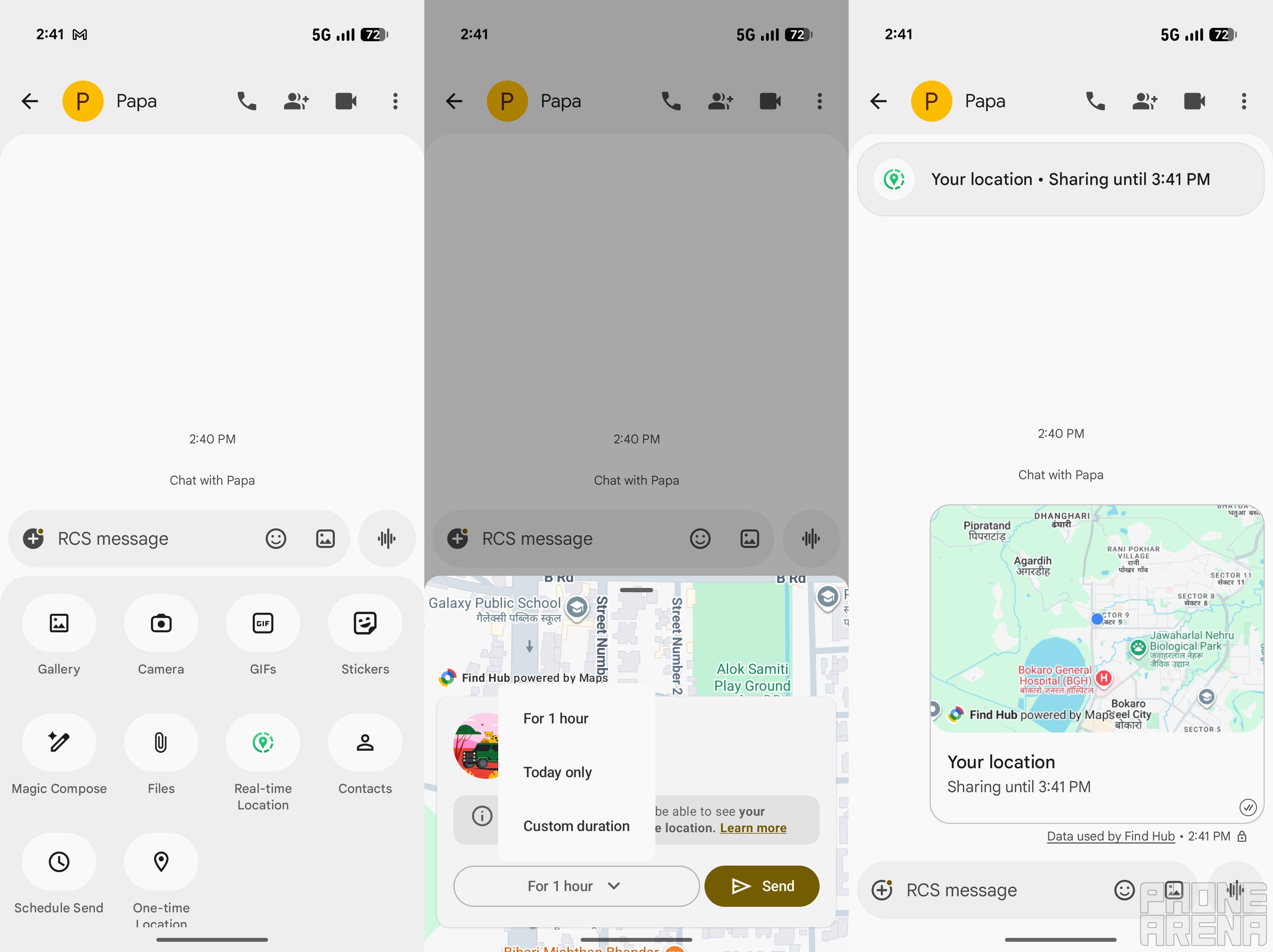
All that said, using the real-time location sharing option is pretty straightforward in Google Messages. Here's how to use it:
Open the chat with the person you want to share your location with
Tap the plus icon on the left side of the text field, then choose Real-time location from the list of options
Select the duration for which you want to share your location. You can choose 1 hour, the entire day, or a custom duration
Finally, tap the Send button
At the top of the chat, you will see an overlay window indicating that you are currently sharing your location, along with the time for which it will be shared. If you want to stop location sharing before the configured time runs out, tap the overlay window and select the Stop button.
Interestingly, you will also notice a dot on the plus icon on the left side of the text field. It is currently unclear what this actually represents. Many believe that it indicates a new feature has been added to Google Messages.
If that's the case, it should ideally vanish once you have tried out the new feature. However, that doesn't seem to be happening here. It reportedly only goes away when you and someone else share your live locations with each other.
Do you think WhatsApp is slowly becoming less necessary on smartphones?
One less reason to use WhatsApp
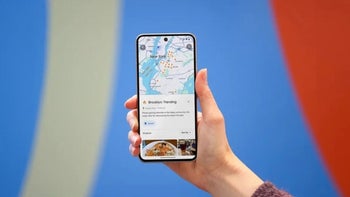
Real time location sharing feature of Google Messages. | Image by PhoneArena
Despite being one of the most popular texting applications, I rarely find myself using WhatsApp these days. Instagram is the main communication app that I have been using a lot recently. And whenever I have to send someone a normal text message, I rely on Google Messages on my Pixel 10 and iMessage on my iPhone 17.
The only reason I had WhatsApp installed on my smartphone was to send my real-time location to friends. But now that the feature is available on Google Messages, I really can't find a reason to keep WhatsApp installed on my phone. It definitely has video call ability, but for that, I use FaceTime on my iPhone and Instagram on my Pixel.
Aman Kumar is a tech news writer with a long-standing passion for smartphones. Aman specializes in everything smartphones, from AI features like Pixel’s Camera Coach to understanding ideal hardware combinations. He loves breaking down complex features in a simple, clear way and hopes manufacturers bring back bold designs like the Nokia N-Gage. When he’s not writing, he’s either gaming on PUBG or talking fitness as a dedicated gym enthusiast.
A discussion is a place, where people can voice their opinion, no matter if it
is positive, neutral or negative. However, when posting, one must stay true to the topic, and not just share some
random thoughts, which are not directly related to the matter.
Things that are NOT allowed:
Off-topic talk - you must stick to the subject of discussion
Offensive, hate speech - if you want to say something, say it politely
Spam/Advertisements - these posts are deleted
Multiple accounts - one person can have only one account
Impersonations and offensive nicknames - these accounts get banned
To help keep our community safe and free from spam, we apply temporary limits to newly created accounts:
New accounts created within the last 24 hours may experience restrictions on how frequently they can
post or comment.
These limits are in place as a precaution and will automatically lift.
Moderation is done by humans. We try to be as objective as possible and moderate with zero bias. If you think a
post should be moderated - please, report it.
Have a question about the rules or why you have been moderated/limited/banned? Please,
contact us.










Things that are NOT allowed:
To help keep our community safe and free from spam, we apply temporary limits to newly created accounts: